
Dynamics 365 has always excelled at capturing and structuring organisational business data. Whether supporting sales activities, customer service cases, financial transactions, or operational processes, it provides the foundation organisations rely on to run day-to-day operations.
With the introduction of Copilot, that foundation is now paired with a generative AI layer embedded directly within the application. Copilot can summarise records, suggest actions, draft responses, and surface insights based on the data already stored in the system, all within the context of the user’s current workflow and governed by existing security roles. This marks a fundamental shift. Dynamics 365 is no longer just a system of record; it is becoming a system that actively supports decision-making and execution.
How Copilot Is Changing the Dynamics 365 Experience
Copilot in Dynamics 365 is embedded directly into the application, working within the context of the records users are navigating through on a day-to-day basis. It operates inside the familiar Dynamics 365 interface, using the organisation’s own data whilst respecting existing security role configuration.
Users would traditionally gain context in Dynamics 365 through navigation. Browse specific records like leads, opportunities, and cases and check the related activities, emails, and notes. All the information required by users was available but pulling it all together took time and familiarity with the data model.
With the two capabilities below, using Dynamics 365 + Copilot, users can request context instead of navigating to assemble it.
1) Summary Feature
Within records such as opportunities, accounts, or cases, users can generate a concise summary of the information stored across the corresponding record and its related activities. Instead of manually navigating through multiple tabs and entries in the record timeline, Copilot can provide a contextual overview of the underlying data captured against the record.
In the example illustrated below, a customer care representative following up on a particular complaint case can generate a summary of recent interactions, any open activities and key updates. This gives the representative the ability to review a long case history in seconds before taking the appropriate follow-up action.
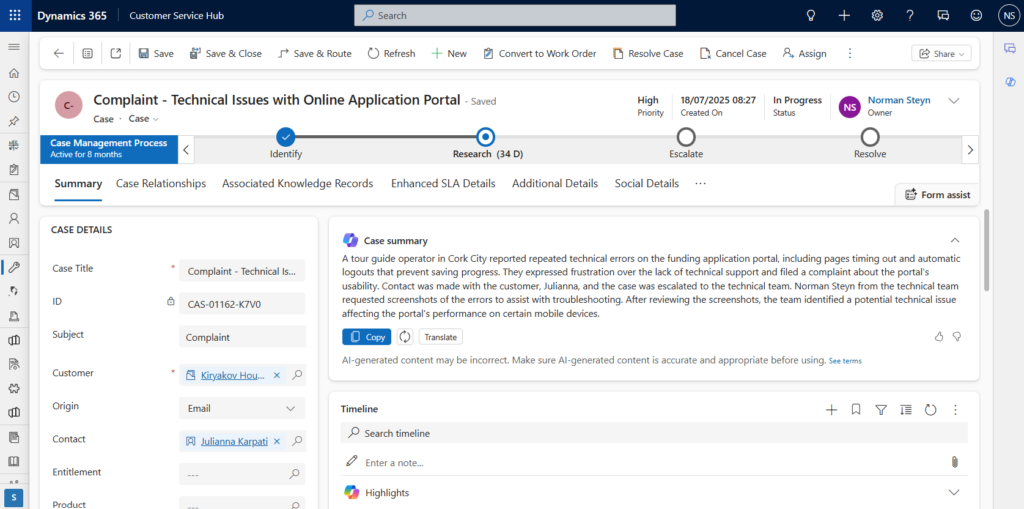
Architecturally, this speaks to the importance of clean data capture and consistent use of notes, activities, and related records that support the overall make-up of the Dynamics 365 record. Copilot can only summarise what exists as well as what the user has permission to see. The quality of the data and security design will directly influence the quality of the output.
2) Copilot Sidebar
Being accessible directly within the application, the Copilot sidebar acts as a now-familiar contextual assistant at a record level. Copilot can answer questions about the current record, draft responses, suggest next steps, and help users’ complete tasks without leaving their current business process.
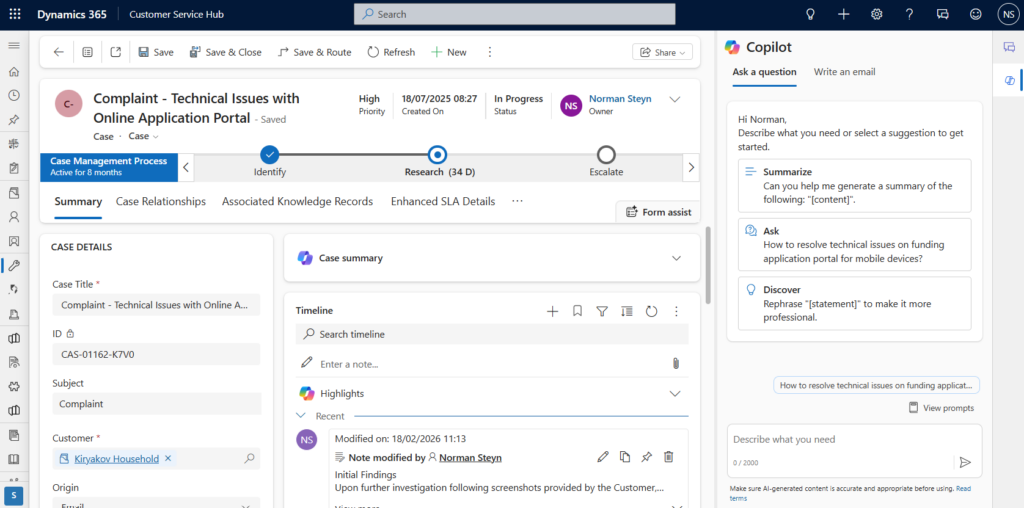
In the example illustrated below, a customer care representative is asking for guidance on next steps to resolve a customer complaint where technical issues are being reported whilst browsing an application portal with a particular device. Dynamics 365 + Copilot can be configured to respond to these queries based on existing case history as well as published knowledge articles.
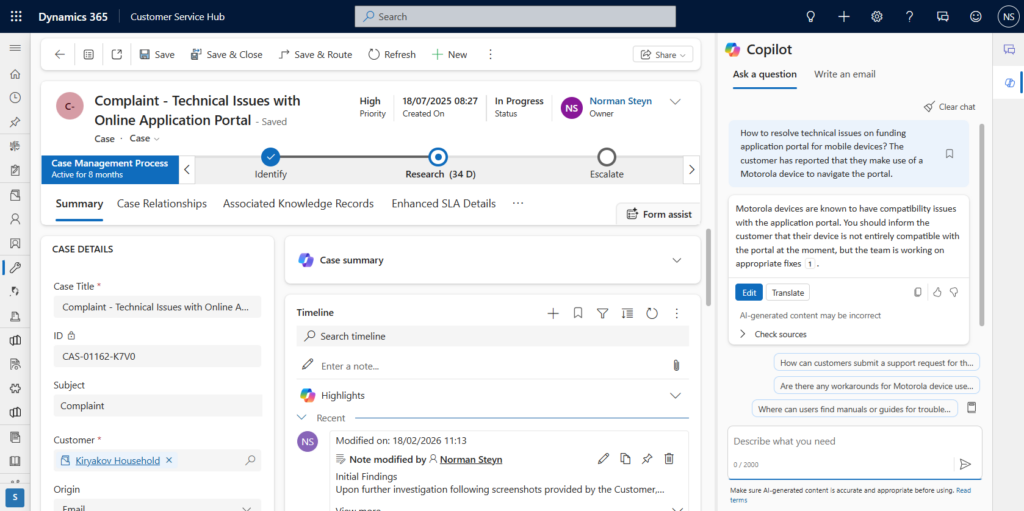
For technical decision makers, the foundation of effective Dynamics 365 + Copilot adoption relies on a well-defined data models and adherence to business processes. This ensures that the information captured across the organisation is accessible and actionable. Configuration and regular validation of security roles is equally as important to guarantee that users have the correct permissions for accessing and generating Copilot insights.
Architectural Considerations
With the introduction of Copilot in Dynamics 365, the core architecture has not changed. The Dataverse, security roles, business process design and data modelling remain fundamental. The shift is in how clearly the quality of that foundation is exposed. The features and capabilities described above rely heavily on the foundational data within the system. If the data captured against records is inconsistent or poorly structured, the output generated by Copilot will reflect that.
Technical decision makers now need to consider not only the design for transactional processing and reporting but also support clear, contextual interpretation when queried dynamically from within the application. This means that for organisations with disciplined data governance and well-structured solutions, Dynamics 365 + Copilot can enhance productivity and decision-making, while in less mature environments it can expose gaps that may have previously gone unnoticed, effectively acting as both an accelerator and a diagnostic tool for Dynamics 365 implementations.
Conclusion
Copilot enhances Dynamics 365 not by replacing its architecture, but by amplifying it. Organisations with well-structured data, disciplined processes, and robust governance will see immediate gains in productivity and decision-making. Those with less mature implementations may find that Copilot exposes gaps that previously went unnoticed. In this sense, Copilot acts as both an accelerator and a diagnostic tool. Its success is not determined by the AI itself, but by the strength of the foundation it is built upon.